Quick answer: Buy a bank under 100Wh so it flies without airline approval, which in practice means 25,000mAh. Then match the USB-C output to your laptop: 140W charges a 16-inch MacBook Pro at its maximum rate, and 100W is plenty for a 14-inch Pro or an Air. Expect about 0.8 of a charge on a 16-inch MacBook Pro and a little over one full charge on a 14-inch. Capacity is nearly identical across the good options, so choose on output and on what else the bank charges without a cable.
For a 16in MacBook Pro, and travel

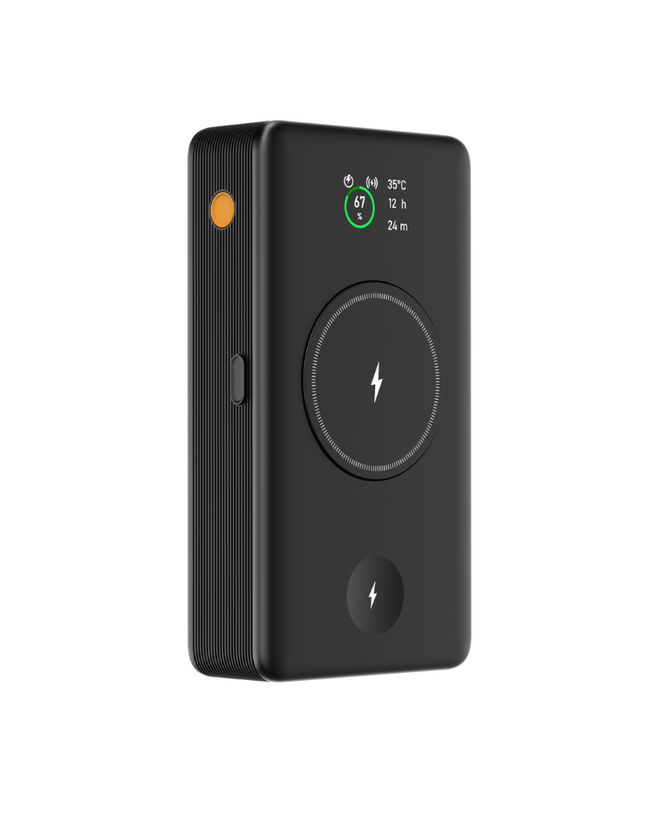
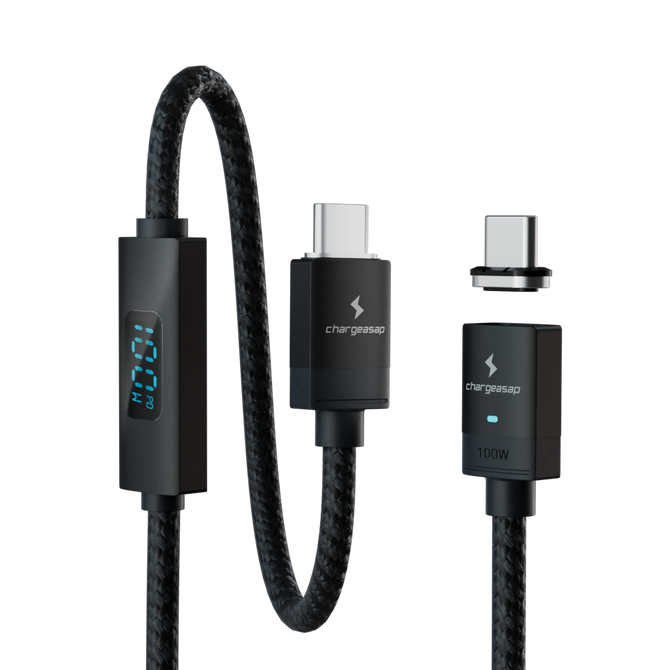
140W USB-C for a laptop, and it charges your phone and watch off its own body, so those chargers stay home.
$249
90.75Wh, flies without approval · 275W total · Free shipping over $99
14in Pro or an Air? Flash Pro Plus, $169
There is a ceiling on this category that almost no review mentions, and once you know about it the whole shelf makes sense.
Airlines cap lithium batteries in carry on luggage at 100 watt hours. Between 100 and 160Wh you need the airline's approval before you fly. Above 160Wh it is banned outright. That single rule is why almost every serious laptop power bank lands at 25,000mAh, which works out at roughly 92Wh, sitting just under the line. Manufacturers are not being shy. They are being legal.
So capacity is close to fixed across the good options. What separates them is what they can do with that capacity, and how many things you stop carrying because of it.
The maths nobody shows you
Watt hours, not milliamp hours, is the number that matters, and the conversion is simple: mAh multiplied by voltage, divided by 1,000. Cells run at 3.7V nominal, so 25,000mAh is about 92Wh.
Now compare that to the laptop. A 16in MacBook Pro has a 99.6Wh battery. A 14in has 72.4Wh. Conversion is never perfect, so a 92Wh bank will not fully refill a 16in from empty. It will get you roughly eight tenths of a charge, and a little over one full charge on a 14in.
That is the real answer to "how many charges will I get", and it is why a bank claiming to charge a MacBook three times is either counting an Air or not counting honestly.
The 2026 comparison
| Power bank | Capacity | Flies without approval | Max USB-C | Total output | Charges without a cable | Price |
|---|---|---|---|---|---|---|
| Chargeasap Flash Pro Ultra | 25,000mAh (90.75Wh) | Yes | 140W | 275W | Phone, plus Apple or Samsung Watch | $249 |
| EcoFlow RAPID Pro | 27,650mAh (99.54Wh) | Yes | 140W | 300W | No | ~$180 |
| Anker Prime 26K | 26,250mAh (under 100Wh) | Yes | 140W | 300W | No | ~$230 |
| Sharge HyperTower | 25,000mAh (~92Wh) | Yes | 140W | 245W | No | ~$200 |
| Anker 25K 165W | 25,000mAh (~92Wh) | Yes | 140W | 165W | No | ~$110 |
| Ugreen Nexode Pro 145W | 25,000mAh (~92Wh) | Yes | 140W | 145W | No | ~$130 |
| INIU Cougar P64 | 25,000mAh (~92Wh) | Yes | 140W | 140W | No | ~$90 |
| Ugreen 48,000mAh | 48,000mAh (~178Wh) | No, banned above 160Wh | 140W | 300W | No | ~$200 |
Look down the capacity column and the ceiling is obvious. Every bank you are allowed to fly with holds within about ten watt hours of every other one. The last row is the exception that proves it: more capacity, and you cannot take it on the plane.
So the decision is not about capacity. It is about the last three columns, and about how much of your bag one battery can absorb.
Our two, and who each is for

Flash Pro Ultra: 16in MacBook Pro, and travel
140W USB-C for a 16in at its maximum rate, 275W total across six devices, and 90.75Wh so it flies without paperwork. The part the table cannot show: it charges the phone and the watch off its own body, so the watch charger and the cable pouch stay at home.
$249 View

Flash Pro Plus: 14in, Air, or a lighter bag
The same 25,000mAh and the same magnetic pad for the phone, at 100W rather than 140W. If your laptop is a 14in Pro or an Air, 140W is headroom you will never use, and this saves you $80.
$169 View
Both carry an OLED showing live wattage and temperature, and both sit under the 100Wh airline limit. Full comparison against the competitors is below.
Chargeasap Flash Pro Ultra, in detail
We built the Flash Pro Ultra around a different question. Everyone else asked how much capacity fits under the airline limit. We asked how much of your bag one battery can absorb.
It holds 25,000mAh at 90.75Wh, comfortably under the 100Wh line, so it flies without paperwork. It puts out 140W on USB-C, which is the most a 16in MacBook Pro accepts, and 275W in total across six devices at once. And it charges a phone and a smartwatch off the body of the bank itself, with no cable and no separate puck. You choose the Apple Watch or the Samsung Watch version when you order.
That last part is the difference the spec table struggles to show. Every other bank on this list is a battery with ports. You still pack the watch charger, still pack the phone cable, still pack the pouch they live in. With the Flash Pro Ultra those go in a drawer at home. On a three day trip that is the difference between a cable pouch and no cable pouch.
Being straight about the trade offs, because a battery with none does not exist:
- 275W is a total, shared across whatever is connected. Six devices at once means each is drawing a share, not its maximum. Run the laptop alone and it gets the full 140W.
- The laptop charges over a USB-C cable, like every laptop does. The magnetic pad is for the phone.
- The magnetic pad is MagSafe compatible, which means it snaps and charges on iPhone. It is not a Qi2 certified accessory, and as with any magnetic charger the speed depends on the phone and whether a case is in the way.
- The built in watch charger is Apple or Samsung, chosen at purchase, not both.
At $249 it is the most expensive bank here. It is also the only one doing more than one job. Price it against a $180 bank plus a watch travel charger plus the pouch they live in, and the gap is smaller than it first reads, and you are still carrying three things instead of one.
The alternatives, briefly
EcoFlow RAPID Pro
The strongest pure battery on the list. 300W total, 140W USB-C with a built-in retractable cable, and 99.54Wh, which is as close to the airline limit as a bank gets. It has no wireless pad and no watch charger, and it weighs 699g against our 590g. If those are irrelevant to you and you want maximum output for the money, this is the one to compare against.
Anker Prime 26K
Well built, 300W across three ports, and 26,250mAh that still sits under the 100Wh limit. No built in charging of any kind, so everything runs on cables you supply.
Sharge HyperTower
Distinctive design, 245W, and a stand that is genuinely useful on a desk. Priced close to premium without the built in charging that would justify it for travel.
Anker 25K 165W and Ugreen Nexode Pro 145W
Both are the same idea at different prices: enough total output to run a laptop and one other thing. Sensible, unremarkable, and they will not surprise you in either direction.
INIU Cougar P64
The budget option. If watt hours and a single 140W port are your only requirements, it meets them at around $90 and nothing else on this list beats it on price. Understand what you are not getting: 140W is also its total, so a laptop plus a phone means the laptop slows down, and there is no built in charging at all.
Ugreen 48,000mAh
Twice the capacity, and at roughly 178Wh it is above the 160Wh ban, so it does not fly. Useful for camping and van life. Do not buy it for a laptop bag you take through an airport.
Check this before you buy anything: find the watt hour figure printed on the bank, not the mAh on the box. Under 100Wh flies. 100 to 160Wh needs airline approval, which in practice means asking at check in and sometimes being told no. Over 160Wh is banned in cabin and hold.
What to buy
- You travel, you wear a watch, and your laptop is a 16in Pro: the Flash Pro Ultra. It is the only one here that removes the watch charger from the bag as well as the phone cable.
- Your laptop is a 14in Pro or an Air: the Flash Pro Plus. Same capacity, same magnetic pad, and you are not paying for 140W you cannot use.
- You want raw output and nothing else: the EcoFlow RAPID Pro.
- You want the cheapest thing that runs a MacBook: the INIU, and accept the cables.
- You are not flying with it: the 48,000mAh Ugreen becomes reasonable.
Frequently asked questions
What is the biggest power bank I can take on a plane?
Under 100 watt hours flies without approval, which is roughly 27,000mAh at 3.7V. Between 100 and 160Wh requires airline approval in advance. Above 160Wh is prohibited in both cabin and checked luggage.
How many times will a 25,000mAh bank charge a MacBook Pro?
About 0.8 charges for a 16in MacBook Pro with its 99.6Wh battery, and a little over one full charge for a 14in at 72.4Wh. A 15in MacBook Air gets around 1.2 charges and a 13in Air around 1.5.
Do I need a cable to charge a laptop from a power bank?
Yes. Laptops charge over USB-C, and no power bank charges a laptop wirelessly. Magnetic pads on power banks are for phones.
Is 140W enough for a 16in MacBook Pro?
Yes. 140W is the maximum the 16in MacBook Pro accepts, so a 140W bank charges it at its maximum rate when nothing else is connected.
Does mAh or Wh matter more?
Watt hours. It is the figure airlines regulate and the only one that compares directly to your laptop battery. Convert with mAh multiplied by 3.7 and divided by 1,000.
Vinson is Cofounder at Chargeasap, an Australian charging hardware company that has run 14 crowdfunding campaigns on Kickstarter and Indiegogo and shipped to more than 108,000 customers since 2016.