Quick answer: Magnetic charging cables are worth it if you plug and unplug the same device several times a day, if the port is on a device you intend to keep for years, or if you have limited dexterity. They are not worth it if you need fast data transfer, if you need the absolute maximum charging speed a 16 inch laptop can take, or if you plug in once a day and leave it. The thing that decides it is not the magnet. It is the wattage ceiling and whether you are willing to commit to one brand's tips.
One cable for phone and laptop

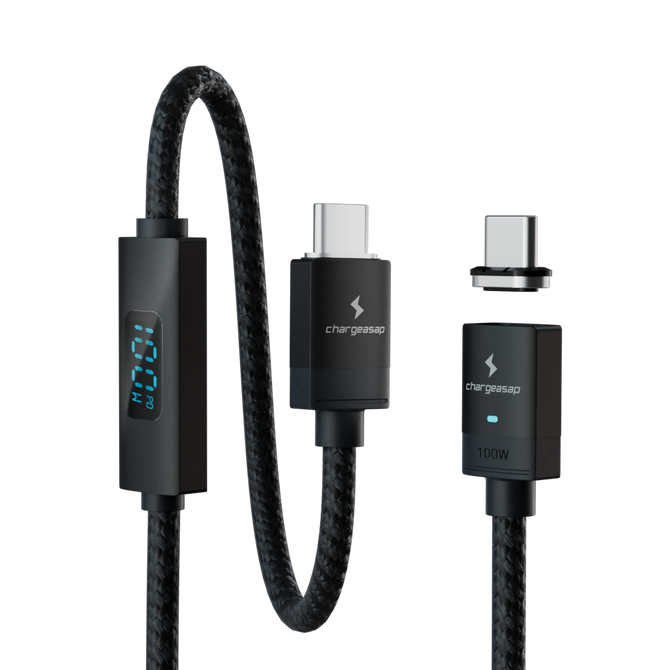
Cable and tip together. Charges a phone, then a MacBook Pro at up to 100W, while the tip protects the port.
$40
★★★★★ 4.96 from 24 reviews · 30-day returns
Extra tips for your other devices: $20 each
What a Magnetic Cable Is Actually For
The marketing says convenience. The real argument is wear.
A USB-C port is a mechanical connector with a finite life. Connector durability is tested to standards such as IEC 60512, and USB-C is typically rated for around 10,000 mating cycles. USB-A, for comparison, is usually rated around 1,500. Ten thousand sounds like a lot until you count honestly: plug and unplug a phone four times a day and you are at roughly 1,460 cycles a year before you include the laptop, the tablet, the headphones and the car.
That rating is also a laboratory target under clean conditions, not a promise. Real ports collect pocket lint, get side loaded when a cable is yanked at an angle, and get plugged in by feel in the dark. Wear arrives sooner than the number suggests.
A magnetic cable moves all of that wear off the device and onto a tip that costs a few dollars to replace. The tip goes into the port once and stays there. The cable attaches and detaches magnetically, thousands of times, and the port never knows.
That is the case. Everything else is secondary.
The Four Things That Decide Whether It Is Worth It
1. The wattage ceiling
This is where most magnetic cables quietly fail. A magnetic connection has to carry current across a physical break in the conductor, and cheap implementations cap out well below what a laptop needs.
| Rating | What it actually runs |
|---|---|
| Up to 27W | Phones and earbuds. Will not charge a laptop meaningfully. |
| 60W | A MacBook Air or a small ultrabook, slowly under load. |
| 100W | Most laptops at their rated wattage, including a 14 inch MacBook Pro. |
| 140W and above | A 16 inch MacBook Pro at its maximum charging rate. |
The majority of magnetic cables sold on marketplaces sit in the first row and are described simply as fast charging, which means nothing. If a listing does not state a wattage figure, assume it is phone only.
2. Data speed, and whether you need any
Be honest with yourself here, because this is where magnetic cables are weakest. Many are charge only and move no data at all. Many others run at USB 2.0 speed, which is 480Mbps, and that is slow enough to be painful for anything larger than a few photos.
If you routinely move video files off a camera or run an external SSD, a magnetic cable is the wrong tool and no amount of wattage fixes that. Use a direct cable for the data work and a magnetic cable for charging. Those are different jobs and there is no shame in owning both.
3. Tip lock-in, which nobody warns you about
Magnetic tips are proprietary. One brand's tips will not work with another brand's cables, and in some cases a brand's newer cables will not work with its own older tips. Once you have bought tips for a phone, a laptop, a tablet and a pair of headphones, you are committed to that brand for as long as you own those devices.
That is not automatically bad. It is the same trade as any ecosystem. But it does mean the question is not only whether this cable is good, it is whether the brand will still be selling compatible tips in three years. Buying into a brand that vanishes leaves you with a drawer of unusable tips and four devices with nothing in the port.
4. Whether the tip is actually comfortable to leave in
The entire proposition depends on leaving the tip in the port permanently. If it protrudes far enough to catch on a pocket, or stops a case from fitting, you will take it out, and then you are simply using a worse cable.
Check the tip depth before you buy, and check whether the tip is removable if you ever need the bare port back.
Who It Is For, and Who It Is Not
| Worth it if | Not worth it if |
|---|---|
| You plug and unplug the same device several times a day | You plug in once at night and leave it |
| The port is on a device you plan to keep for years | You upgrade every year anyway |
| You charge in the dark, in a car, or one handed | You need high speed data through the same cable |
| You have limited dexterity or reduced grip strength | You need the absolute maximum charge rate on a 16 inch laptop |
| You are tired of a charging cable that only works at one angle | You are unwilling to commit to one brand's tips |
| You want one cable that handles phone and laptop | You only ever charge a phone |
If you landed in the left column, this is what we would start you on. Connect Pro carries 100W, which puts it in the third row of that wattage table rather than the first: one cable that charges a phone and then a MacBook Pro at up to 100W, with the tip staying in the port so neither device wears out its connector.
If you landed in the left column

Connect Pro cable set: start here
Cable and tip together, which is what you need if you are starting from scratch. E-Mark certified for a genuine 100W, gold-plated pins, and a built-in amp reader so you can see the actual current flowing rather than assuming.
$40 View

Extra tips: one per device
The system only pays off once every port you use has a tip living in it. USB-C, Lightning and Micro USB, so the laptop, the tablet and the older device in the drawer are all covered by the one cable.
$20 View
Already have tips? Cables on their own: 40cm $28, 2m $32, 2m swivel head $35.
Being straight about the limits, because a buyer's guide that only lists strengths is an advertisement. Connect Pro is 100W, not 140W. If you own a 16 inch MacBook Pro and want it charging at its absolute maximum rate, use a direct 140W cable for that machine. And like every magnetic system on the market, the tips are proprietary to it, so the third criterion above applies to us as much as to anyone.
Cheap Magnetic Cables Are a Different Product
A magnetic tip sits exposed in a port with contacts facing outward. On a well engineered cable those contacts are only live when the cable is attached and the handshake has completed. On a cheap one they may not be, and a tip carrying voltage in a pocket full of keys and coins is a short circuit waiting to happen.
This is the part of the category where the savings are not savings. A cable rated for 100W is moving real power, and the components that make that safe cost money.
What to check before buying any magnetic cable: a stated wattage figure rather than the words fast charging, a stated data speed or an honest statement that it is charge only, a named brand that will still exist in three years, and tips sold separately so you can replace one without replacing everything.
So, Are They Worth It?
For a phone you plug in once a night, no. The convenience is real but small, and you are buying into an ecosystem for very little return.
For someone moving between a desk, a bag and a car several times a day, with a laptop and a phone and a tablet all using the same cable, yes. The port protection alone justifies it over the life of the devices, and the daily friction it removes is the kind you stop noticing only because it is gone.
The decision is not really about magnets. It is whether you plug in often enough for the wear to matter, and whether the cable you choose carries enough power to be the only one you need.
Compare all Chargeasap magnetic cables
Vinson is Cofounder at Chargeasap, an Australian charging hardware company that launched its first cross-device magnetic cable, asap X-Connect, in 2016. The company has run 14 crowdfunding campaigns on Kickstarter and Indiegogo and shipped to more than 108,000 customers since 2016.
FAQ
Are magnetic charging cables worth it?
They are worth it if you plug and unplug the same device several times a day, if you want to protect a port on a device you plan to keep for years, or if you charge one handed or in the dark. They are not worth it if you need fast data transfer through the same cable, or if you plug in once a night and leave it.
Do magnetic charging cables damage your phone?
A well made one does the opposite. The tip stays in the port and takes the wear that repeated plugging would otherwise put on the connector, which is typically rated for around 10,000 mating cycles. The risk is with cheap cables where the contacts may be live when detached, which creates a short circuit hazard in a pocket.
Can magnetic cables charge a laptop?
Only if they are rated for it. Most magnetic cables cap out around 27W, which is phone territory. A 100W rated magnetic cable will charge most laptops at their rated wattage, including a 14 inch MacBook Pro. A 16 inch MacBook Pro at its maximum rate needs 140W, which is beyond what most magnetic cables carry.
Do magnetic charging cables transfer data?
Some do, many do not. A large share are charge only, and many that do carry data run at USB 2.0 speed, which is 480Mbps. If you regularly move large files or run an external drive, use a direct cable for that and keep the magnetic cable for charging.
Are magnetic tips interchangeable between brands?
No. Magnetic tips are proprietary, and in some cases a brand's newer cables will not work with its own older tips. This means choosing a magnetic cable is really choosing a brand to stay with for as long as you own those devices, so it is worth checking the brand will still be supplying tips in a few years.