Quick answer: Ignore the magnet strength and the braiding. Three numbers decide a magnetic cable: the wattage it carries, the data speed it carries, and whether the brand will still sell you a replacement tip in three years. Most magnetic cables on marketplaces are 20W to 27W and charge phones only. If you want one cable for a phone and a laptop you need 100W, and very few magnetic cables go beyond that.
Our 100W pick

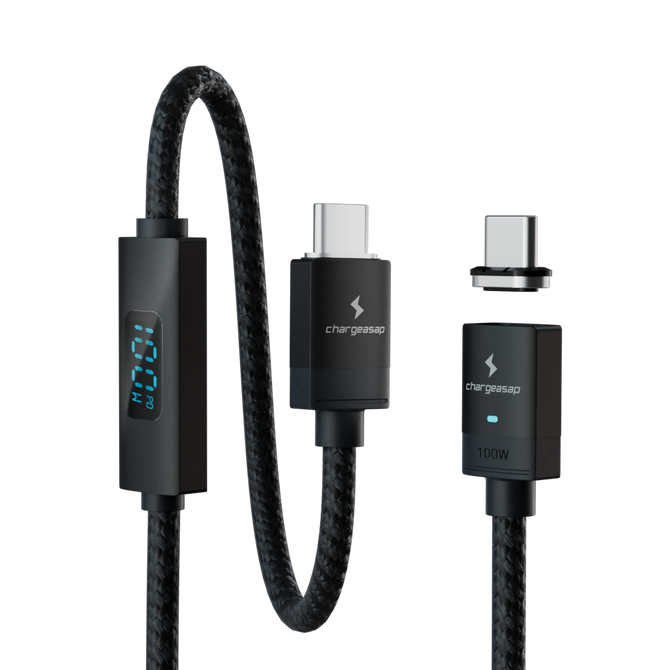
Cable and tip together. Phone, tablet and laptop at up to 100W, with a built-in reader showing live current draw.
$40
★★★★★ 4.96 from 24 reviews · 30-day returns
Extra tips for your other devices: $20 each
What You Are Actually Buying
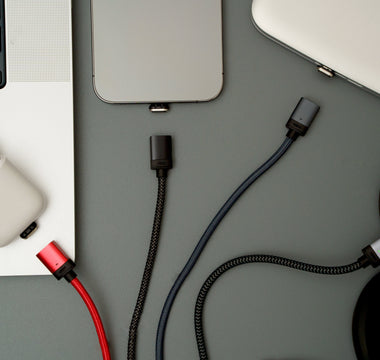
The magnet is not the product. The product is a tip that lives permanently in your device's port, taking the wear that thousands of insertions would otherwise put on the connector.
USB-C connectors are typically rated for around 10,000 mating cycles under laboratory conditions. Plug a phone in four times a day and you are at roughly 1,460 a year before you count the laptop, the tablet and the car. Real ports collect lint, get side loaded and get plugged in by feel in the dark, so they wear faster than the rating suggests.
Everything else in a magnetic cable listing is secondary to that.
The Three Numbers
1. Wattage
| Rating | What it actually runs |
|---|---|
| 15W to 27W | Phones and earbuds only |
| 60W | A MacBook Air, slowly under load |
| 100W | Phone, tablet, and every laptop except a 16 inch MacBook Pro, at its rated wattage |
| 140W and above | A 16 inch MacBook Pro at its maximum rate |
That third row is where most people live. A 14 inch MacBook Pro charges at 96W. A MacBook Air charges at 35W or 70W. Unless you own the largest MacBook Pro Apple makes, 100W is not a compromise, it is the correct specification.
The large majority of magnetic cables sold on marketplaces sit in the first row and are described only as "fast charging", which is a phrase with no definition. If a listing does not state a wattage figure, assume it is phone only and move on.
2. Data speed, and whether you need any
This is where the category is weakest. Many magnetic cables carry no data at all. Many others run at USB 2.0, which is 480Mbps, and that is perfectly adequate for a charging cable but slow for anything larger than a handful of photos.
Be honest about whether you need it. If you move video off a camera or run an external SSD, use a direct cable for that job. A magnetic cable is for charging, and a cable that tries to do both often does neither well.
3. Tip lock-in
Magnetic tips are proprietary. One brand's tips do not fit another brand's cables, and some brands have broken compatibility with their own older tips between generations. Once you have fitted tips to a phone, a laptop, a tablet and a pair of headphones, you are committed to that brand for as long as you own those devices.
So the real question is not whether this cable is good today. It is whether this company will still be selling compatible tips in three years, and whether you can buy a single replacement tip rather than a whole new set.
What the Market Looks Like
| Cable | Max wattage | Data speed |
|---|---|---|
| Chargeasap Connect ProBuilt in amp reader shows live current draw. Tips sold individually from $20, cables from $28. | 100W | 480Mbps |
| Statik MagStack ProHeavily marketed, specifications hard to verify | Not published | Not published |
| TOPK 100WMarketplace budget tier | 100W | Not published |
| Juice MagTecPhone only | 15W | Not published |
The 100W option, priced by part

Connect Pro cable set: start here
Cable and tip together, which is what you need if this is your first magnetic cable. E-Mark certified for a genuine 100W, 480Mbps data, and a built-in amp reader showing live current draw: the one spec nothing else in the table publishes.
$40 View

Tips: one per device, sold individually
Fitting out four devices does not mean buying four cables, and losing one tip does not mean replacing a set. USB-C, Lightning and Micro USB.
$20 View
Already have tips? Cables on their own: 40cm $28, 2m $32, 2m swivel head $35.
Which One to Buy
For almost everyone, a 100W cable is the answer. Connect Pro carries 100W, covering a phone, a tablet and every laptop short of a 16 inch MacBook Pro at its rated wattage, with 480Mbps data.
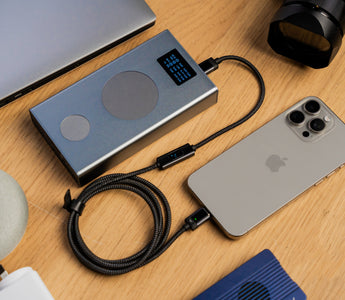
What it has that nothing else in this category does is a built in amp reader. The cable shows you the live current draw while it is charging. That sounds like a novelty until the first time a device charges slowly and you can see immediately whether the problem is the cable, the charger or the device, instead of swapping parts and guessing.
If you own a 16 inch MacBook Pro, be aware that very few magnetic cables carry the 140W it charges at. A 100W cable still charges it, just more slowly, so this only matters if maximum charging speed on that one machine is your deciding factor.
If you only ever charge a phone, almost anything with a stated wattage figure will do, and you would be better off spending the difference on a decent charger.
If your laptop is the reason you are buying, our 100W magnetic laptop cables are the ones to look at. For phone and mixed device use, the full magnetic cable range covers every device type.
Vinson is Cofounder at Chargeasap, an Australian charging hardware company that has run 14 crowdfunding campaigns on Kickstarter and Indiegogo and shipped to more than 108,000 customers since 2016.
FAQ
What is the best magnetic charging cable?
For most people a 100W cable, because 100W charges a phone, a tablet and every laptop except a 16 inch MacBook Pro at its rated wattage. Connect Pro is our pick at that rating because it is the only magnetic cable with a built in amp reader showing live current draw, and tips are sold individually rather than only in sets.
Can magnetic cables charge a laptop?
Only if rated for it. Most magnetic cables cap out between 15W and 27W, which is phone territory. A 100W cable charges most laptops at their rated wattage, including a 14 inch MacBook Pro. A 16 inch MacBook Pro charges at 140W, which very few magnetic cables carry.
Do magnetic charging cables transfer data?
Some do, many do not. Those that do typically run at USB 2.0 speed, which is 480Mbps, and that is what Connect Pro carries. For charging that is fine. If you move large files regularly, use a direct cable for that job. Most manufacturers in this category do not publish a data figure at all, which is itself informative.
Are magnetic tips interchangeable between brands?
No. Tips are proprietary to each brand, and some brands have broken compatibility with their own earlier generations. Choosing a magnetic cable means choosing a company to stay with for as long as you own those devices, so check that the brand sells replacement tips individually and is likely to still be doing so in a few years.
How much should a magnetic charging cable cost?
A phone-only cable at 15W to 27W sells for very little and is priced accordingly. A genuine 100W cable carries an E-Mark chip and the components to move that power safely, which puts a complete cable and tip around $40, with additional tips around $20 each. A 100W claim at a phone-cable price is not a bargain, it is a claim.