
Quick answer: To charge several devices from one plug, add up the watts of everything you charge at the same time, then pick a charging station with at least that much total power and one port strong enough for your biggest device. A phone, watch and earbuds need about 30W. A laptop, tablet and phone need 100W to 150W. Two laptops plus a phone and a tablet need 200W to 280W.
Our pick for two laptops and more

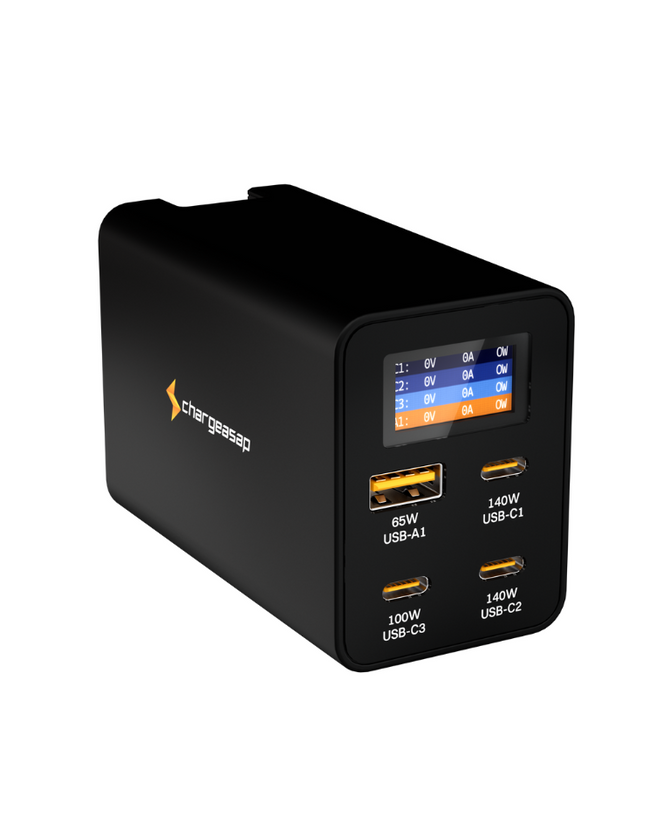
Four ports from one plug. Two laptops at up to 140W each, with a display that shows the watts on every port.
$219 $189
★★★★★ 4.91 from 139 reviews · Free shipping over $99 · 30-day returns
Charging one laptop and a phone? Omega 100W, $49
Step 1: Add Up Your Watts
Every device charges at a certain power, measured in watts (W). A charging station for multiple devices has a total it can give out, shared between its ports. So the first job is a simple sum: list what you plug in at the same time and add the numbers.
| Device | Power it charges at |
|---|---|
| 16-inch MacBook Pro | 140W |
| 14-inch MacBook Pro | 96W for fast charging |
| MacBook Air (2022 or later) | 67W to 70W for fast charging, slower on a smaller charger |
| Other USB-C laptops | Usually 45W to 100W. Check the label on the charger it came with |
| iPad or other tablet | 20W or more |
| iPhone or other phone | 20W or more. Some newer models fast charge at 40W or more |
| Watch or earbuds | About 5W |
Mac and iPhone figures are from Apple's own support pages: Fast charge your MacBook Air or MacBook Pro and Fast charge your iPhone. Apple says fast charging takes a MacBook to about 50 percent in around 30 minutes.
Three common setups, added up:
| What you charge at once | The sum | Charger size to look for |
|---|---|---|
| Phone, watch and earbuds | 20W + 5W + 5W = 30W | 30W to 45W |
| MacBook Air, tablet and phone | 70W + 20W + 20W = 110W | 100W to 150W |
| 16-inch MacBook Pro, a second laptop, tablet and phone | 140W + 96W + 20W + 20W = 276W | 250W to 300W |
You can go under the sum. Devices only draw full power when their battery is low, so a charger a little below your total still works. Things just charge more slowly when everything is plugged in and empty at once.
Step 2: Check the Ports, Not Just the Total
The total on the box is only half the story. Each port has its own limit, and that limit decides whether your biggest device charges at full speed.
- Find the strongest single port. A 16-inch MacBook Pro needs one port that gives 140W. A 200W charger whose best port is 100W will still charge it, but more slowly.
- Count the high-power ports. If two people work from the same plug, you need two laptop-grade ports, not one strong port and three weak ones.
- Look for the sharing table. When several ports are in use the power is split between them. A good product page shows the exact split for every combination. If a brand does not publish it, assume the split is not flattering.
- Use a cable that can carry the power. A 100W port needs a 100W cable. A 140W port needs a cable rated for 140W or more, such as a 240W USB-C cable.
Step 3: Pick the Type of Charging Station
| Type | Best for | Watch out for |
|---|---|---|
| Multi-port GaN wall charger | Laptops, tablets and phones together, at home or travelling. Plugs straight into the wall | Check the per-port power, as above |
| Desktop USB charging station with a power cord | A fixed desk with lots of ports in reach | Bigger and heavier, and the cord makes it awkward to pack |
| Wireless 3-in-1 stand | A phone, watch and earbuds on a bedside table | Will not charge a laptop or most tablets |
| Power strip with USB ports | Devices that still need a wall socket, with a phone on the side | The USB ports are usually low power, too slow for a laptop |
For most people charging a laptop plus other devices, a multi-port GaN wall charger is the right kind. GaN (gallium nitride) is the material that lets a high-power charger be small enough to carry. Our GaN chargers are all this type. Shops also sell them as a USB charging station or a desktop charging station. It is the same thing: several USB ports from one plug.
Which Size Fits You
Three sizes, same idea

Omega 100W: one laptop and a phone
100W across two USB-C ports and one USB-A. Enough for a MacBook Air or a 13 to 14-inch laptop with a phone or tablet alongside, in a charger that fits a small bag.
$49 View

Omega 200W: a laptop plus two or three things
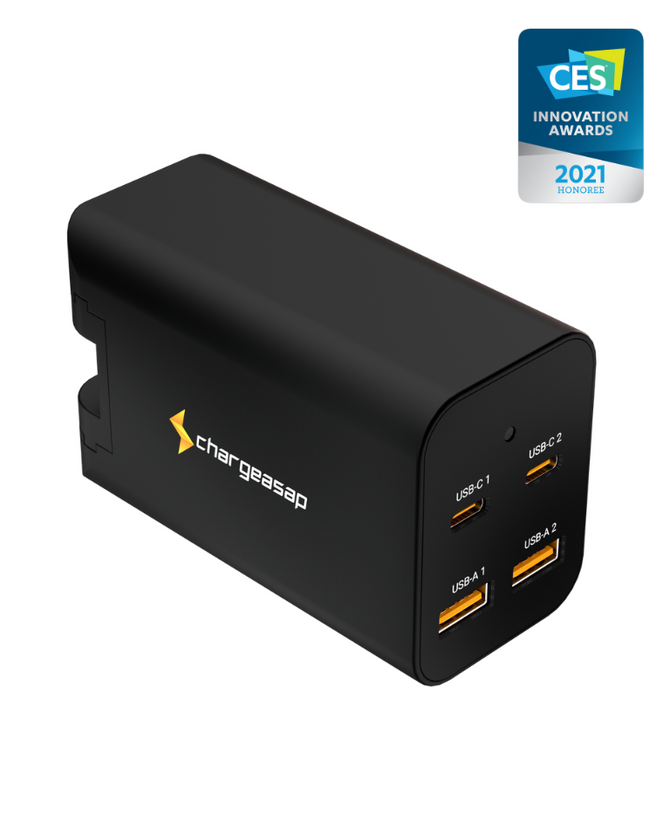
200W across four ports: two USB-C at up to 100W each and two USB-A. Runs two laptops at 100W each, or one laptop with a tablet, phone and watch.
$139 View
Zeus 280W: two big laptops and more
280W across three USB-C ports and one USB-A. Two of the USB-C ports give up to 140W each, enough for two 16-inch MacBook Pros from one plug.
$189 View
Where Zeus 280W fits
Zeus is for the third row of the table above: the desk or travel bag with two laptops in it. It has four ports and 280W in total, and it is the only one of our chargers with two 140W ports. Its display shows the watts going to each port, so you can see what every device is drawing.
It replaces four Apple chargers in 66% less space*, measures 89 x 59 x 44 mm and weighs 380 g. US, UK, EU and AU plugs come in the box, which covers 150+ countries. More than 10,000 people use one.
*Volume comparison: Zeus 280W (89 x 59 x 44 mm) against the four Apple USB-C power adapters needed to match its four ports: 140W + 140W + 96W + 70W.
When a smaller charger is enough
If your sum from Step 1 is under about 110W and you only have one laptop, Zeus is more than you need. Omega 100W covers a laptop and a phone. Omega 200W covers a laptop with a tablet, phone and watch, or two smaller laptops. Spend the difference on good cables.
If you never charge a laptop, you do not need any of these. A small 30W to 45W charger or a wireless stand will do the job.
Vinson is Cofounder at Chargeasap, an Australian charging hardware company that has run 14 crowdfunding campaigns on Kickstarter and Indiegogo and shipped to more than 108,000 customers since 2016.
FAQ
What is the best charging station for multiple devices?
The one whose total power matches what you charge at the same time, with one port strong enough for your biggest device. For a phone, watch and earbuds that is a 30W to 45W charger. For a laptop, tablet and phone it is 100W to 150W. For two laptops plus a phone and tablet it is 200W to 280W, such as the Zeus 280W.
How many watts do I need to charge several devices at once?
Add up the watts of each device. A phone or tablet is about 20W, a watch or earbuds about 5W, a MacBook Air about 70W, a 14-inch MacBook Pro 96W and a 16-inch MacBook Pro 140W. A charger slightly under your total still works, but devices charge more slowly when everything is plugged in at once.
Can one charger charge two laptops at the same time?
Yes, if it has two laptop-grade USB-C ports and enough total power. Two 100W ports and 200W in total will run two laptops at 100W each. Two 16-inch MacBook Pros at 140W each need two 140W ports and 280W in total, which is what the Zeus 280W has.
Does charging several devices at once slow each one down?
It can. A multi-port charger shares its total power between the ports in use, so each port may get less than its maximum when all of them are busy. Check the charger's power sharing table for the exact split, and plug your laptop into the strongest port.
Will a high-wattage charger damage my phone?
No. With USB-C Power Delivery the device asks for the power it can take and the charger supplies only that. A phone plugged into a 140W port draws its own 20W to 40W, not 140W.