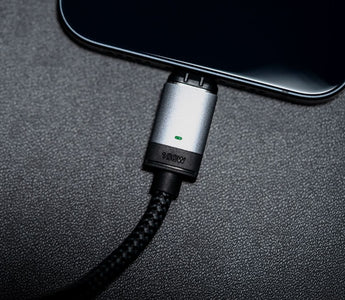
Quick answer: Most magnetic chargers that stop working have dirt on the gold contact pins. Clean the tip and the cable head with a dry cotton bud, reseat the tip so it sits flush and straight in the port, and let the cable snap on from directly in front. If it still will not charge, put your cable on a different tip, or a different cable on your tip: whichever half fails is the part to replace. If a normal USB-C cable also fails in the same port, the problem is the port or the wall charger, not the magnetic cable.
Tip or cable worn out?

The tip lives in your port and wears out first. Replace just the part that failed. USB-C, Lightning or Micro USB.
$20
100W rated · Gold-plated pins · 30-day returns
Cable gone too? 2m cable, $32 or cable and tip set, $40
We created the world's first cross-device magnetic cable, asap X-Connect, back in 2016. Dozens of cheaper alternatives have flooded the market since, and the number one complaint we hear from people who bought those is the same: the magnetic charger stopped working, or never worked properly in the first place.
Because we have been designing and refining magnetic cables for a decade, we know why magnetic chargers fail and how to fix them. This guide covers every cause, in the order that solves the most cases.
Already a Chargeasap customer? If your cable or tip failed within the warranty period, this is a replacement, not a purchase. Work through the checks below first — most faults are debris on the contacts — then start a warranty claim here if it is genuinely faulty.
First: Understand How a Magnetic Charging Cable Works
A magnetic charging cable has two parts: the cable itself, and a small magnetic tip that stays plugged into your device's USB-C port. When you bring the cable close, the magnets snap together and complete the charging circuit.
The connection relies on tiny gold-plated contact pins on both the tip and the cable head making clean, aligned contact. If anything disrupts that contact — dirt, misalignment, a weak magnet, or a damaged pin — the charging stops or never starts.
The 6 Most Common Causes (and How to Fix Each One)
1. Debris on the magnetic contacts
This is the most common cause by far. The magnetic tip sits in your USB-C port all day, collecting pocket lint, dust, and skin oils. Even a thin film of debris on the gold contact pins is enough to break the electrical connection.
Fix: Remove the magnetic tip from the port. Use a dry cotton bud or a soft toothbrush to gently clean both the tip contacts and the cable head contacts. Do not use water or alcohol directly on the pins. Reconnect and test. This resolves the issue in the majority of cases.
2. The tip is not seated correctly in the port
USB-C ports have a small amount of play. If the magnetic tip is slightly crooked in the port, the contact pins on the tip will not align with the pins on the cable head, and charging will be intermittent or absent.
Fix: Remove the tip and reinsert it carefully, making sure it sits flush and straight in the port. You should feel it click into place. Then reconnect the cable and check that the LED indicator (if your cable has one) lights up immediately.
3. The cable is not fully snapped onto the tip
The magnetic connection between the cable and the tip needs to be firm and centred. If the cable is snapped on at an angle, the contact pins may only be partially touching.
Fix: Pull the cable away from the tip completely, then let it snap back on from directly in front. You should hear and feel a clean snap. If the cable is wobbling or can be moved side to side easily, the magnet may be weakened (see point 5).
4. The cable does not support the required wattage
This is where cheaper alternatives cause the most problems. Many cheap magnetic cables claim to support 100W but use internal wiring that cannot safely carry that current. The result is that the cable charges at a fraction of the rated speed, or the device's charging controller rejects the connection entirely.
Our Connect Pro magnetic cables are rated and tested to 100W. They use an E-Mark chip inside the cable that communicates the cable's capabilities to the charger and device, ensuring the correct power level is negotiated. Cables without an E-Mark chip cannot reliably carry more than 60W regardless of what the packaging claims.
Fix: If you are using a third-party magnetic cable and your laptop is not charging at full speed, the cable is the likely culprit. Test with a known-good USB-C cable to confirm.
5. The magnet has weakened over time
Cheaper magnetic cables use lower-grade magnets that lose their strength after repeated connections and disconnections. A weak magnet means the cable does not snap on firmly, the contact pressure is insufficient, and charging becomes unreliable.
Fix: Test the magnet strength by holding the cable near the tip without touching it. A good magnetic cable should snap together from at least 10-15mm away with a satisfying click. If the attraction feels weak or the cable needs to be almost touching the tip before it connects, the magnet has degraded. Replace the cable.
6. The wall charger or the device port is the problem
If none of the above fixes work, the issue may not be the magnetic cable at all. There are two things to rule out at this stage.
The wall charger: Try a different USB-C wall charger. Some lower-wattage or non-PD chargers do not negotiate correctly with magnetic cables, especially at higher wattages. Swap to a known-good PD charger and test. If charging resumes, the original charger was the issue.
The device port: Plug a standard USB-C cable directly into the same port on your device. If that also charges slowly or not at all, the port itself needs attention. Check for bent pins or debris using a light and a magnifying glass. Gently clear any debris with a wooden toothpick. If the pins are bent, the port will need professional repair.
Quick Diagnostic Table
| Symptom | Most Likely Cause | Fix |
|---|---|---|
| No charging at all, LED off | Dirty contacts or tip misaligned | Clean contacts, reseat tip |
| Intermittent charging, keeps disconnecting | Weak magnet or partial contact | Snap cable on straight, check magnet strength |
| Charging but very slowly | Cable does not support required wattage | Check cable wattage rating, replace if needed |
| Works with some devices but not others | Wattage negotiation failure (no E-Mark chip) | Use a cable with E-Mark certification |
| Standard USB-C cable also fails in same port | Damaged device port | Professional port repair |
If the table points at the cable or the tip rather than the port or the charger, replace only the part that failed. Test which one it is first: put your cable on a different tip, or a different cable on your tip. Whichever combination charges tells you which half is dead.
If it is the cable or the tip

Connect Pro cable — 100W, 2m
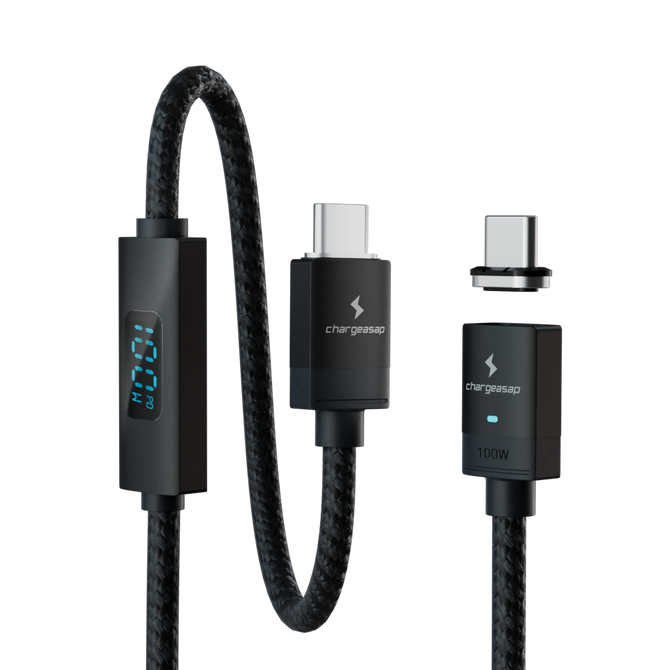
Cable only, for when the tip is fine. Our third-generation magnetic laptop cable: E-Mark certified for a genuine 100W, gold-plated pins, and a built-in amp reader showing live wattage — so next time you can see whether you are getting 100W, 65W or nothing.
Also in 40cm at $28 and 2m swivel head at $35.
$32 View

Connect Pro tip — replacement
The tip lives in your port and takes the abuse, so it wears out first. Available in USB-C, Lightning and Micro USB. If your cable works on a different tip, this is the only part you need.
$20 View
Need both? The cable set at $40 includes a cable and a tip together, which is cheaper than buying the two separately. And if it is faulty rather than worn out and still inside the warranty period, claim a replacement instead of buying one.
If you own an Infinity cable. Infinity has been discontinued, and Connect Pro is its replacement. The two ranges are not cross-compatible — an Infinity tip will not work with a Connect Pro cable, or the other way round, so replace them as a pair rather than mixing them. If you would rather stay on Infinity, we still have Infinity cables in stock here while they last.
How to Avoid These Problems With Your Next Magnetic Cable
After a decade of building magnetic cables and watching what goes wrong with cheaper alternatives, here is what to look for when buying:
- E-Mark chip inside the cable: Required for reliable 100W+ charging. Ask the brand directly if their cable has one. If they do not know, it does not.
- Gold-plated contact pins: Gold resists oxidation, which keeps the contacts clean and conductive over time. Cheaper cables use uncoated pins that corrode within months.
- Strong neodymium magnets: The snap should be firm and satisfying. Weak magnets are the single biggest cause of intermittent charging complaints.
- Built-in amp reader: Our Connect Pro cables go further than a simple LED. They display the live wattage being delivered in real time, so you can see at a glance whether your laptop is receiving 100W, 65W, or something lower — which tells you immediately whether the connection is working at full speed.
Ticks all four: E-Mark, gold pins, strong magnets, live wattage
Connect Pro cable — 100W, 2m
Cable only, for when the tip is fine. Our third-generation magnetic laptop cable: E-Mark certified for a genuine 100W, gold-plated pins, and a built-in amp reader showing live wattage — so next time you can see whether you are getting 100W, 65W or nothing.
Also in 40cm at $28 and 2m swivel head at $35.
$32 View
Connect Pro tip — replacement
The tip lives in your port and takes the abuse, so it wears out first. Available in USB-C, Lightning and Micro USB. If your cable works on a different tip, this is the only part you need.
$20 View
Need both? The cable set at $40 includes a cable and a tip together, which is cheaper than buying the two separately. And if it is faulty rather than worn out and still inside the warranty period, claim a replacement instead of buying one.
Shop the full Chargeasap magnetic cable range
Vinson is Cofounder at Chargeasap, creators of the world's first cross-device magnetic cable (asap X-Connect, 2016). The company has run 14 crowdfunding campaigns on Kickstarter and Indiegogo, shipped to more than 108,000 customers and has personally tested every magnetic cable in this guide.
FAQ
Why is my magnetic charger not working?
The most common causes are dirty contact pins on the magnetic tip or cable head, a tip that is not seated straight in the USB-C port, or a cable that does not support the required wattage. Clean the contacts with a dry cotton bud, reseat the tip, and test. This resolves the issue in the majority of cases.
Do I need a new cable or just a new tip?
Test them separately. Put your cable on a different tip, or a different cable on your tip. Whichever combination charges tells you which half has failed. The tip sits in the port and takes most of the wear, so it is the more common failure of the two, and it costs less to replace on its own.
How do I clean a magnetic charging tip?
Remove the tip from your device's port. Use a dry cotton bud or soft toothbrush to gently clean the gold contact pins on both the tip and the cable head. Do not use water or alcohol directly on the pins. Allow to dry fully before reconnecting.
Can a magnetic charger damage my USB-C port?
A quality magnetic cable with a well-fitting tip will not damage your port. The tip is designed to sit flush inside the port without putting stress on the port walls or pins. Cheap tips with poor tolerances can cause wear over time, which is one reason to use a cable from a reputable brand.
What wattage do I need for a magnetic laptop charging cable?
For MacBook Air, you need at least 30W. For MacBook Pro 14-inch, at least 67W. For MacBook Pro 16-inch, at least 100W. Make sure the cable has an E-Mark chip, which is required for reliable delivery above 60W. The Chargeasap Connect Pro is rated to 100W and is E-Mark certified.
Is the Infinity cable still available, and does it work with Connect Pro?
Infinity has been discontinued and replaced by Connect Pro. The two are not cross-compatible, so an Infinity tip will not work with a Connect Pro cable or vice versa — replace them as a matching pair. Remaining Infinity stock is still available while it lasts.